COD Order Confirmation on WhatsApp: Stop Paying to Ship Orders Nobody Wanted
Cash on delivery is what makes ecommerce work in a lot of markets. It is also the line item quietly destroying margins, because a meaningful share of those orders never get accepted at the door. The parcel goes out, travels, gets refused, and travels back. You pay both ways and end up with returned stock and nothing to show for it.
The industry calls this return to origin, and most stores treat it as a cost of doing business. It does not have to be. A large portion of refused COD orders can be filtered out before dispatch with one message, sent on a channel customers actually answer.
Why COD Orders Get Refused
Refused parcels are rarely fraud. They are usually one of a handful of ordinary situations, and each one is avoidable if you catch it early.
Some orders are impulse purchases the customer cooled on within a day. Some are duplicates, placed twice because a checkout appeared to fail. Some carry a wrong or incomplete address, or a phone number the courier cannot reach. And some are simply forgotten, so the customer is genuinely confused when someone turns up asking for money.
What every one of these has in common is that they are visible before the parcel leaves your warehouse, provided somebody asks. The problem is that asking, by phone, at scale, is slow and expensive.
Why Phone Calls Stopped Working
The traditional fix is a call centre confirming orders by phone. It works, but the economics are punishing. Every call needs an agent, calls take time, and a large share go unanswered because people ignore numbers they do not recognise.
Even when a customer answers, you are left with a note in a spreadsheet rather than a record. There is nothing written, nothing timestamped, and no way to prove what was agreed if a customer later disputes it.
WhatsApp inverts all of that. The message arrives somewhere the customer already looks, they answer when convenient, and the whole exchange is written down.
What a Good COD Confirmation Message Looks Like
The message has one job, which is to make confirming easier than ignoring. That means short, specific, and answerable with a single tap.
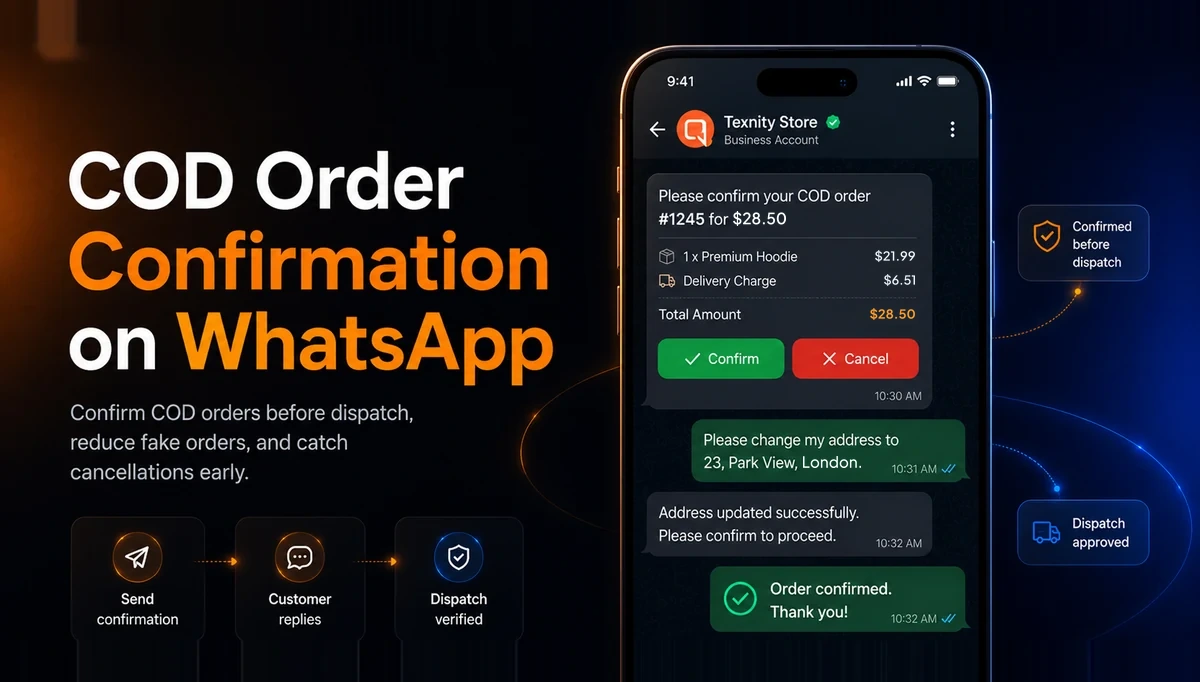
Include the order number, the items and the total, so the customer recognises the purchase immediately. Vague messages get ignored because they look like spam. Then give two buttons, one to confirm and one to cancel.
The buttons matter more than the wording. Asking someone to reply with the word yes creates friction and typos. A quick reply button is one tap, and the response comes back as structured data your automation can act on rather than free text somebody has to read.
- Lead with your store name so the message is recognised instantly.
- State the order number, the items and the total amount payable on delivery.
- Give a clear confirm button and a clear cancel button.
- Say what happens next, including when the parcel will be dispatched.
- Keep it to a few lines. A long message reads as marketing and gets skipped.
Automating the Confirmation Before Dispatch
Done manually this is just a slower call centre. The value appears when the whole sequence runs on its own.
The order event from your store fires an approved confirmation template automatically, so the message goes out within minutes of the order being placed rather than the next morning. When the customer taps confirm, the order status advances automatically and it moves into your dispatch queue. If they tap cancel, the order is cancelled and never gets picked or packed.
If nobody responds at all, a single follow up the next day catches most of the remaining orders. What is left after that is a much smaller list of genuinely uncertain orders that a human can look at, instead of every order you took.
What Happens to Orders Nobody Confirms
This is the decision that actually determines your return to origin rate, and it is a commercial call rather than a technical one.
Holding every unconfirmed order guarantees a low refusal rate, but it also means cancelling real orders from customers who simply do not check WhatsApp. Dispatching everything regardless keeps sales up and changes nothing about your costs.
Most stores land somewhere in between, based on order value. A small order is worth dispatching unconfirmed because the loss if it is refused is manageable. A high value order is worth holding until somebody confirms, because a single refused parcel wipes out the margin on several successful ones.
Whatever you choose, make it a written rule rather than a judgement call made differently by whoever is packing that day.
Confirmation Is Also a Conversation
The confirmation message opens a channel, and customers use it. They will reply asking to change a size, correct an address, add an item or move the delivery to a different day.
Those replies are worth far more than the confirmation itself, because each one is a problem being fixed before it becomes a refused parcel. But they only have value if somebody sees them, which is why the replies need to land in a shared inbox rather than on a phone in someone's pocket.
With every reply in one queue, attached to the order, any agent can pick it up, correct the address in the store, and let the order continue. The customer gets what they wanted and you avoid shipping something that was going to come straight back.
Measuring Whether It Worked
Do not judge this on gut feel. The numbers are easy to track and they tell you quickly whether the message is earning its place.
- Confirmation rate: the share of COD orders that get an explicit confirm or cancel response.
- Return to origin rate before and after, which is the number that actually pays for the effort.
- Cancellations caught before dispatch, being orders you never paid to ship.
- Time to confirmation, which tells you whether your follow up timing is right.
- Support volume, since confirmation messages tend to reduce where is my order questions as a side effect.
Getting Started Without Overbuilding It
You do not need the full sequence on day one. Start with a single confirmation template on the order placed event, with confirm and cancel buttons, and hold nothing back from dispatch. Watch the confirmation rate for a fortnight.
Once you can see how many people respond, add the follow up for non responders, then introduce a holding rule for high value orders. Building it in that order means every step is a decision made with your own data rather than someone else's benchmark.
Automatic COD confirmation runs on the official WhatsApp Business API, so your number stays safe while the volume grows. Our Shopify integration page covers how store events trigger these messages, and the ecommerce solutions page shows how confirmation fits alongside abandoned cart recovery and order tracking.
Ready to run WhatsApp the official way?
Official API access, a shared inbox, automation and reports in one place.