WhatsApp Message Templates: What They Are and How to Get Them Approved
Every business using the official WhatsApp Business API runs into templates on day one, usually by having one rejected. You write what feels like a perfectly reasonable order confirmation, submit it, and get back a rejection with a reason code that explains very little.
Templates are not there to make life difficult. They are the mechanism that stops WhatsApp turning into the marketing dumping ground that email became. Once you understand what Meta is actually checking, approvals become routine. This guide covers the categories, the approval process, the rejection reasons that come up most often, and how to write templates that pass the first time.
What a Message Template Actually Is
A template is a pre approved message format that your business can send to a customer outside an open conversation. That last part is the whole point.
When a customer messages you, a 24 hour customer service window opens, and inside that window you can reply freely with whatever you like. Once it closes, you cannot simply start typing. To reach that customer again you need an approved template.
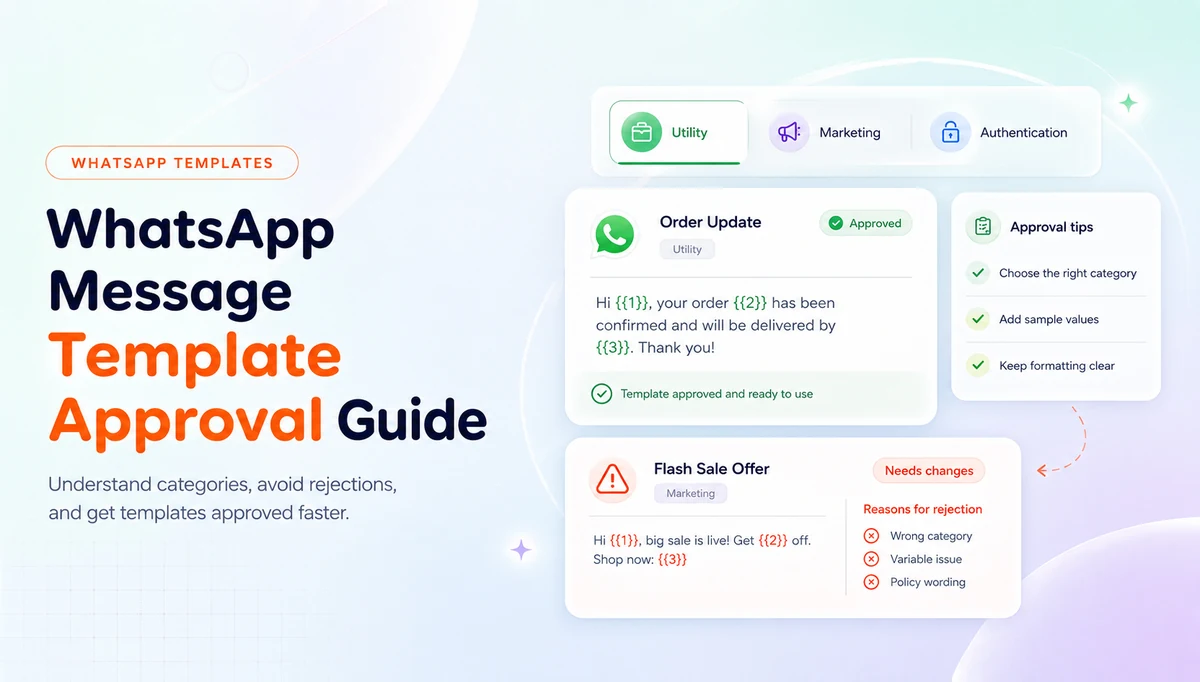
Templates carry variables, written as placeholders that get filled in at send time with real values like a name, an order number or a tracking link. You write and submit the structure once, and it then serves every customer who receives it.
The Three Template Categories
Meta sorts every template into one of three categories, and picking the right one matters both for approval and for what you are charged. Choosing marketing when you mean utility is one of the most common and most expensive mistakes.
- Utility: messages about a specific transaction the customer has already made. Order confirmations, shipping updates, delivery notices, appointment reminders, payment receipts and account alerts.
- Marketing: anything promotional. Offers, product launches, back in stock alerts, seasonal campaigns, re engagement messages and anything designed to create a new purchase rather than service an existing one.
- Authentication: one time passcodes and verification codes, nothing else. This category has a tightly restricted format and cannot carry promotional content of any kind.
How the Approval Process Works
You submit a template with its category, language and content, and Meta reviews it. Most reviews come back quickly, often within minutes, though it can take longer during busy periods. In Texnity you submit templates from inside the portal and watch the status change there, rather than switching between platforms.
A template comes back as approved, rejected, or occasionally flagged for a category change, which is Meta telling you the content does not match the category you claimed. If it is rejected, you can edit and resubmit. There is no penalty for a single rejection, though a pattern of rejections is not a good look for your account.
Approved templates are not approved forever. If a template consistently generates blocks or reports from customers, its quality rating drops, and templates with a persistently low quality rating can be paused.
The Most Common Reasons Templates Get Rejected
Rejection reasons tend to be terse, so here is what they usually mean in practice.
- Wrong category. A promotional message submitted as utility is the single most frequent rejection. If the message tries to create a sale rather than service one, it is marketing.
- Variable at the very start or very end. A template that opens or closes with nothing but a placeholder gives the reviewer no context to judge, and it will be rejected.
- Too many variables and too little text. A template that is mostly placeholders reads as a shell that could be filled with anything, including content that would never have been approved.
- Placeholder examples that do not match. If your sample values are nonsense like test or 123, a reviewer cannot verify what the message will really say.
- Formatting and spelling problems. Broken grammar, odd capitalisation and stray punctuation get read as low quality and rejected.
- Content that breaks WhatsApp policy. Anything in a restricted category, misleading claims, or requests for sensitive information such as full card numbers.
How to Write a Template That Gets Approved
The reliable approach is to write the template as if you are explaining it to the reviewer rather than to a system. Make the purpose obvious from the first line.
Start with real words, not a variable. Opening with a greeting and your business name gives immediate context. Keep the ratio of text to placeholders sensible, so a reader can tell what the message is about even with every variable stripped out.
Give realistic sample values. If the variable is an order number, the example should look like an order number from your store. If it is a name, use an actual name. This is the fastest way to shorten a review.
Match the category honestly. If you genuinely want to promote something, submit it as marketing and accept the pricing. Trying to disguise a promotion as a utility message tends to fail, and when it does slip through it damages your quality rating instead.
Buttons, Headers and Footers
Templates are not limited to plain text, and the extra components are usually what make them work.
A header can carry a short line of text or a media item such as an image or document, which is useful for an invoice or a product shot. A footer holds small print, and it is the natural place for an opt out line on marketing templates.
Buttons are the most valuable component. Quick reply buttons let a customer respond with a single tap, which is what makes order confirmation flows work at all. Call to action buttons can open a URL or dial a number, so a shipping notice can carry a live tracking link rather than a URL the customer has to copy.
Every one of these components is reviewed along with the body, so a template with a misleading button will be rejected even if the text is fine.
Opt In, Quality Rating and Staying Out of Trouble
Approval is only the first hurdle. Staying approved depends on how customers react to what you send.
You need a genuine opt in before you message someone. Checkout is the easiest place to collect it for a store, and it should be clear what the customer is agreeing to receive. A list bought or scraped from somewhere else is the fastest possible route to a blocked number.
Meta tracks a quality rating per number, driven largely by blocks and reports. Frequency is what usually damages it. A store that sends four promotional templates a week will train its own customers to block it, and once the rating falls the messaging limits follow.
The safest pattern is to be generous with utility messages, which customers actively want, and disciplined with marketing ones.
A Practical Starting Set
Most stores do not need dozens of templates. A small, well written set covers the majority of real traffic, and each one can be reused indefinitely.
- Order confirmation with the order number, total and a confirm button.
- Order shipped with tracking details and a link button.
- Order delivered with a short thank you and a support prompt.
- Abandoned cart reminder with a cart restore link, submitted as marketing.
- Payment reminder for unpaid or partially paid orders.
- Out of hours acknowledgement so customers know when they will hear back.
Managing Templates Without Switching Tools
The friction most teams feel is not writing templates, it is administering them across two systems. You build in one place, submit somewhere else, then try to remember which version was approved.
In Texnity, templates are created, submitted for Meta approval and triggered from the same portal that holds your inbox and your automation, so an approved template can be attached directly to a store event or a chat flow.
If you want to see the whole lifecycle in one place, our message templates feature page walks through building, approval and automatic sending. The WhatsApp Business API integration page covers how the official platform sits underneath all of it.
Ready to run WhatsApp the official way?
Official API access, a shared inbox, automation and reports in one place.