Instagram Integration for Texnity: Manage DMs and WhatsApp in One Shared Inbox
A customer sees your product in a story, taps reply on Instagram, and asks the price. The next day, she opens WhatsApp to check on delivery. To her, that was never two conversations. It was one. But on your side, it lands in two different places, handled by two different people, and measured according to two completely different standards.
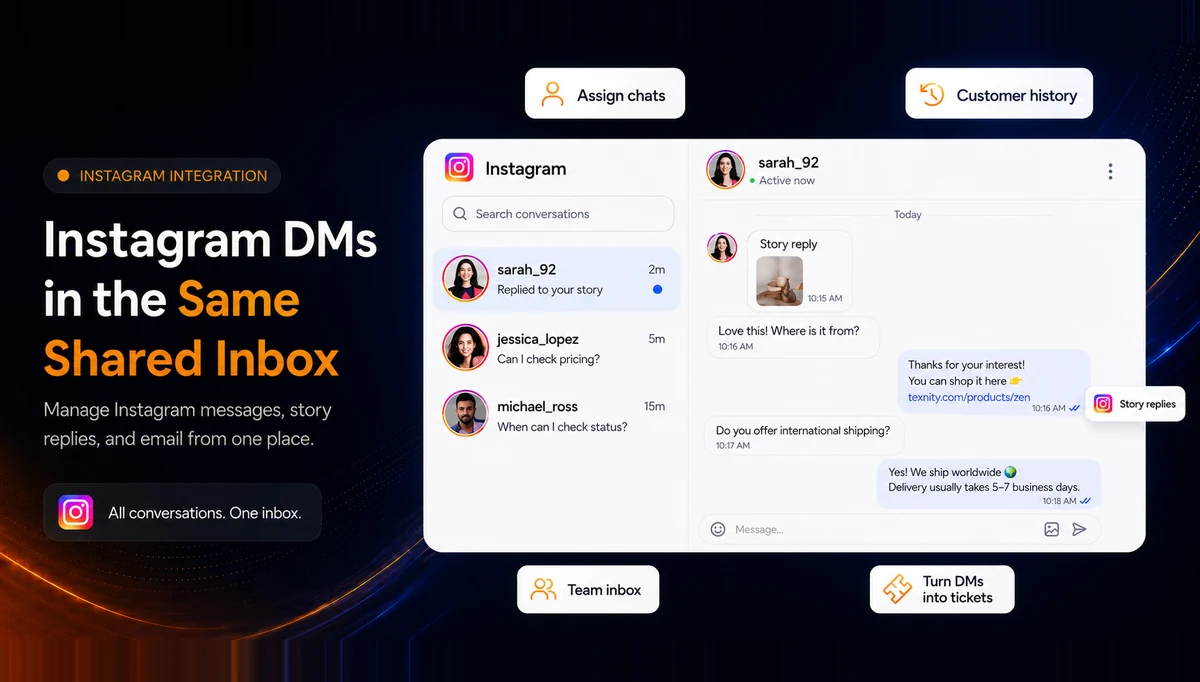
That gap is exactly what the new Instagram integration closes. Texnity now connects Instagram directly, so a DM arrives in the same shared inbox your agents already use for WhatsApp, attached to the same customer, with the same history, labels, and tickets. No extra app, no separate login, and no message quietly slipping through the cracks.
The Problem: Instagram Lives on Someone's Phone
For most small and growing teams, Instagram is answered the way it always has been, on a phone, by whoever happens to have the login open. There is no queue. There is no assignment. There is no record. A DM gets read, then buried under the next twenty, and a week later, nobody can honestly say whether it was ever answered.
Meanwhile, WhatsApp runs like a real support channel. It sits in a shared inbox with agents, labels, and tickets. A manager can see who replied, how fast they replied, and what is still open.
One customer, two standards of service: Instagram on a phone versus a tracked Texnity inbox
The result is two standards of service for the same customer, and a manager who can measure one channel but is flying blind on the other. When a founder asks, "How many Instagram enquiries did we lose last month?" the honest answer is usually a shrug.
What the Instagram Integration Does
Once you connect an Instagram Professional account, Instagram simply behaves like any other channel in Texnity. There is nothing new to learn. Your agents keep working the way they already do. Instagram messages just show up in the mix. Here is what actually changes for the team.
DMs and Story Replies in the Shared Inbox
Instagram direct messages and story replies appear in the Texnity inbox, right next to WhatsApp and email. Agents read the message, reply from the same composer, send photos and files, and work through the same queue without ever opening the Instagram app on a phone.
WhatsApp, Instagram, and email conversations in one shared Texnity inbox with channel badges
One History per Customer
This is the part teams feel most. The Instagram handle is matched to a contact, so a customer's DMs and WhatsApp messages resolve to the same person. An agent opening the conversation sees the whole relationship, including past orders, previous tickets, internal notes, and lifetime value, rather than just the isolated channel in front of them.
Aisha Malik's unified customer profile with Instagram and WhatsApp history, orders, and notes on one contact
So when Aisha messages on Instagram after ordering twice on WhatsApp, your agent is not starting from zero. They already know she is a repeat customer who prefers Arabic replies. That context is the difference between a generic reply and one that actually feels like service.
Assignment, Labels, and Reporting
Instagram chats can be routed to a department, assigned to a specific agent, and labelled like any other conversation. That means Instagram finally shows up in the same reporting as the rest of your support, including response times, volume, and resolution, instead of being an invisible channel nobody can account for. If it is not measured, it cannot be improved. Now it is measured.
Turn a DM Into a Ticket
Instagram chats can be routed to a department, assigned to a specific agent, and labelled like any other conversation. That means Instagram finally shows up in the same reporting as the rest of your support, including response times, volume, and resolution, instead of being an invisible channel nobody can account for. If it is not measured, it cannot be improved. Now it is measured.
How a DM Reaches Your Agent
It is worth being precise about the plumbing because "we integrate with Instagram" can mean many things, and some of them are fragile. Texnity connects Instagram through Meta, in the same way your WhatsApp Business account is connected. Nothing is scraped. No phone stays logged in. No browser automation quietly breaks at 2 a.m.
The path of an Instagram DM into Texnity: customer sends a DM, Meta delivers it, Texnity matches it to a contact, and it enters the inbox
The path is short and reliable:
Customer DMs: Someone sends a message or replies to one of your stories.
How to Connect Instagram in Texnity
Setup takes a couple of minutes and does not require developer help. If you can connect WhatsApp, you can connect Instagram.
Connecting Instagram in Texnity settings, including chat routing, automatic contact enrichment, and ticket creation from DMs
1. Open Instagram in Settings
Go to Settings → Instagram, under Channels and Calls.
What to Know Before You Switch
Instagram is a Meta channel, so it comes with a few rules of its own. It is worth being specific about them rather than simply using the word "integration" and hoping for the best. Here is the honest, no-surprises version.
The reply window is the main rule to understand. Just like WhatsApp, Meta gives you 24 hours from the customer's last message to reply freely. Texnity shows the time remaining on each chat so agents can prioritise the conversations that are about to close. If your team is already used to the WhatsApp window, this will feel completely familiar.
Who This Is For
This integration earns its keep fastest when customers already reach you on Instagram and someone is answering those messages by hand today. In practice, that usually includes the following teams:
Retail and Fashion Brands
Customers ask about price, size, and stock in DMs and story replies, and those messages often get lost in a busy, phone-based inbox. Every buried DM is a sale that quietly walked away.
Businesses Running Instagram Ads
Ready to run WhatsApp the official way?
Official API access, a shared inbox, automation and reports in one place.